Ruining My First Coffee!
Nothing ruins a peaceful morning quite like a certificate expiration. There I was, coffee in hand, when I noticed certificate alerts for many of the apps running in my lab. My thoughts:
- “Ouch, I forgot to renew it again!”
- “I have an important meeting tomorrow, I may need this environment running properly”
- “I will have meetings until 11am, can’t do it before then…”
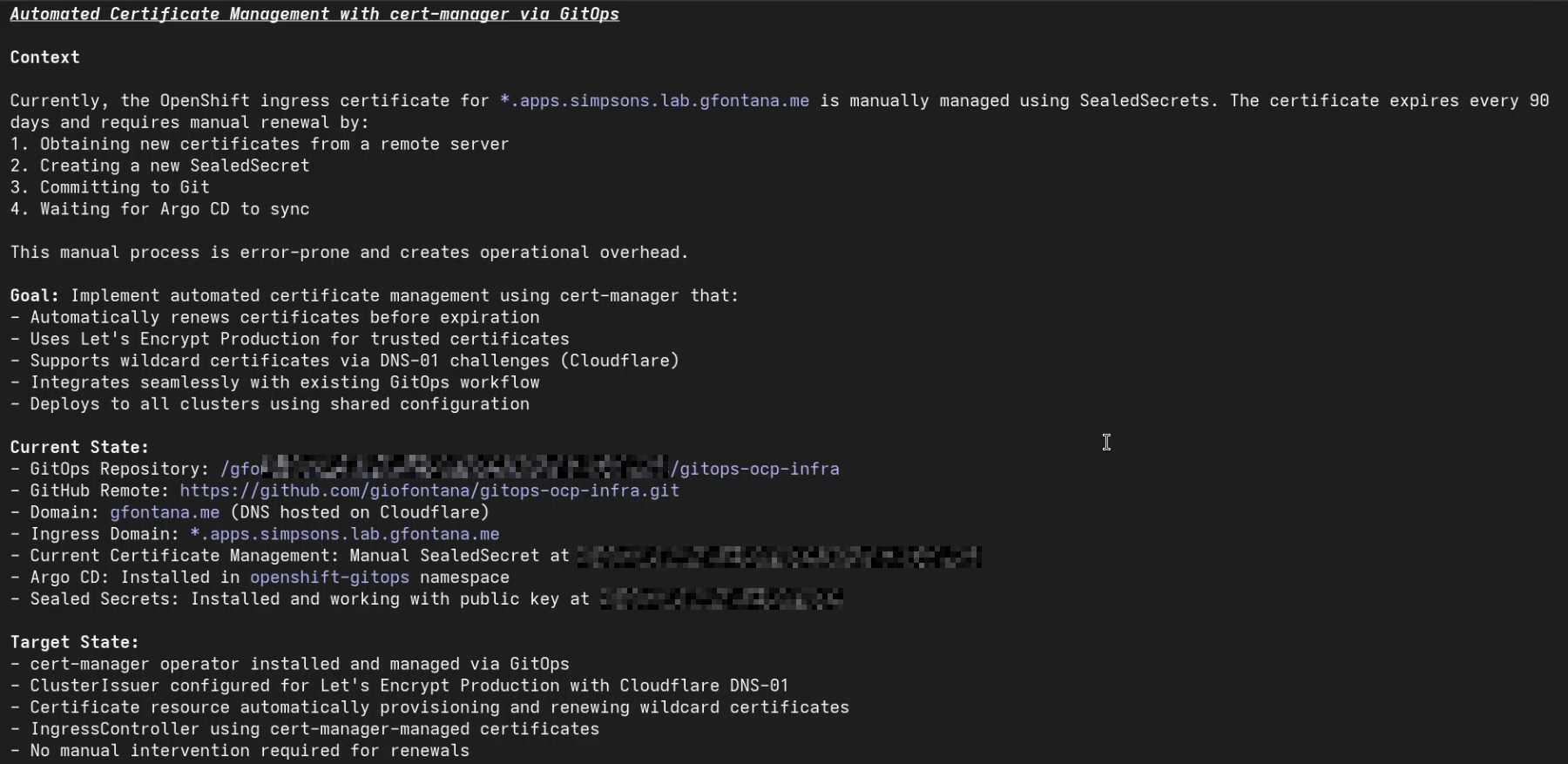
- “Wait, I do have Claude Code now… what if I ask it to do it for me?!”
Here’s how it all went down!
For the past year, I’d been managing this certificate manually through a tedious process:
- SSH into a remote server to request new certificates from Let’s Encrypt
- Download the certificates and encrypt them with Sealed Secrets
- Create a new SealedSecret manifest
- Commit to Git and wait for Argo CD to sync
- Hope everything works without breaking ingress
Every. Single. 90 days.
I wanted to automate this process with cert-manager, but I’d never had the time to create the necessary GitOps configuration files for deployment and setup (I try to deploy and manage everything in my lab using GitOps wherever possible, so I can quickly re-build it from scratch if I have to).
So, this was the last time. I decided this morning would be different. I’d use Claude Code to not only handle this renewal quickly but finally implement the cert-manager with GitOps that I wanted to do long ago.
Act 1: The Quick Fix (Morning Emergency)
First things first—I needed to renew the expiring certificate before thinking about automation. With Claude Code as my AI pair programming partner, what usually took me an hour was done in minutes.
Claude Code helped me:
- Navigate to the remote server and run the certificate renewal commands
- Properly encrypt the new certificate with
kubeseal - Update the SealedSecret manifest in my GitOps repository
- Verify the deployment through Argo CD
Time saved: What normally took me 20-30 minutes of manual steps was reduced to no more than 10 minutes (well, honestly it took basically 1 or 2 minutes of my time, the rest was observing Claude to do it and approving execution of codes and commands).
But as I watched Argo CD sync the new certificate, I knew this was just postponing the inevitable. In 90 days, I’d be back here doing the same thing. It was time to automate.
Act 2: The Automation Decision
Over my second coffee, I outlined what I needed:
- Automatic certificate renewal: Use cert-manager to automatically renew OpenShift Default Ingress certificate.
- GitOps-native: Everything managed declaratively through Argo CD.
- Let’s Encrypt integration: Continue using free, trusted certificates.
- DNS-01 challenge: For wildcard certificates with Cloudflare DNS.
I told Claude Code: Now, can you read the repo at <folder for my gitops manifests> and suggest changes to be able to use cert-manager to auto renew default ingress cert? cert-manager operator needs to be installed and configure through GitOps (Argo CD)
What followed was an impressive demonstration of how helpful Claude can be to automate repetitive tasks very quickly.

Act 3: The Implementation Journey
Understanding the Environment
Claude Code immediately understood my GitOps repository structure:
- Repository: gitops-ocp-infra
- Pattern: Cluster-specific configurations with shared operator bases
- Target: simpsons cluster at
*.apps.simpsons.lab.gfontana.me(Curious why this cluster is named “Simpsons”? Check the reason in the end of this article). - GitOps Engine: Argo CD managing all cluster resources
Phase 1: Leveraging my current GitOps standards
Instead of creating operator manifests from scratch, Claude Code recognized the pattern I use for GitOps and suggested the implementation of cert-manager following the same pattern.
My GitOps follows a layered based approach, in which I separate shared operators and manifests from cluster specific configurations. I also use an Aggregation layer and App-of-Apps to bootstrap all apps. It is not a simple framework, it took me a very long time to develop it and Claude was able to understand it in a matter of seconds. I am planning to publish an article specifically about the way I structure and use GitOps, stay tuned!
One thing that Claude wasn’t able to detect initially was how I re-use manifests from gitops-catalog. Initially it created all manifests to deploy cert-manager operator (OperatorGroup, Subscription, etc.). I had to ask Claude the following:

Note: This folder points to gitops-catalog, which is a fork of this repo.
Claude understood what I wanted and updated the cert-manager operator kustomization YAML.
File: /gitops/manifests/operators/cert-manager-operator/overlays/stable/kustomization.yaml
apiVersion: kustomize.config.k8s.io/v1beta1
kind: Kustomization

resources:
  - https://github.com/giofontana/gitops-catalog//openshift-cert-manager-operator/operator/overlays/stable-v1?ref=main
This approach:
- Reused well-tested configurations
- Maintained a single source of truth
- Eliminated duplicate manifests
- Referenced the
stable-v1channel automatically
Phase 2: Cloudflare DNS-01 Configuration
For wildcard certificates, DNS-01 challenges are required. Claude Code helped me configure the ClusterIssuer with Cloudflare integration:
File: /gitops/manifests/clusters/simpsons/configuration/cert-manager/clusterissuer-letsencrypt-prod.yaml
apiVersion: cert-manager.io/v1
kind: ClusterIssuer
metadata:
  name: letsencrypt-prod
spec:
  acme:
    server: https://acme-v02.api.letsencrypt.org/directory
    email: admin@gfontana.me
    privateKeySecretRef:
      name: letsencrypt-prod-account-key
    solvers:
    - dns01:
        cloudflare:
          email: admin@gfontana.me
          apiTokenSecretRef:
            name: cloudflare-api-token
            key: api-token
      selector:
        dnsZones:
        - "gfontana.me"
Security note: The Cloudflare API token was stored as a SealedSecret, encrypted and safe for Git storage.
Phase 3: Certificate Resource Definition
Here’s where things got interesting. Claude Code initially created the Certificate resource. We deployed it, watched the logs, and… error.
The commonName Bug Fix
I messed it up! Claude correctly set the commonName and dnsNames. However, I changed it to add some other aliases and mistakenly removed gfontana.me from dnsNames, which caused the certificate request to fail with a validation error.
apiVersion: cert-manager.io/v1
kind: Certificate
metadata:
  name: wildcard-apps-cert
  namespace: openshift-ingress
spec:
  secretName: wildcard-apps-tls
  issuerRef:
    name: letsencrypt-prod
    kind: ClusterIssuer
  commonName: "gfontana.me"
  dnsNames:
  - "gfontana.me"  # <-- This line was missing, causing the error
  - "*.gfontana.me"
  - "*.simpsons.lab.gfontana.me"
  - "*.apps.simpsons.lab.gfontana.me"
  usages:
  - digital signature
  - key encipherment
  - server auth
  renewBefore: 720h  # Renew 30 days before expiry
Claude Code not only identified the failure, but also fixed it and asked my permission:
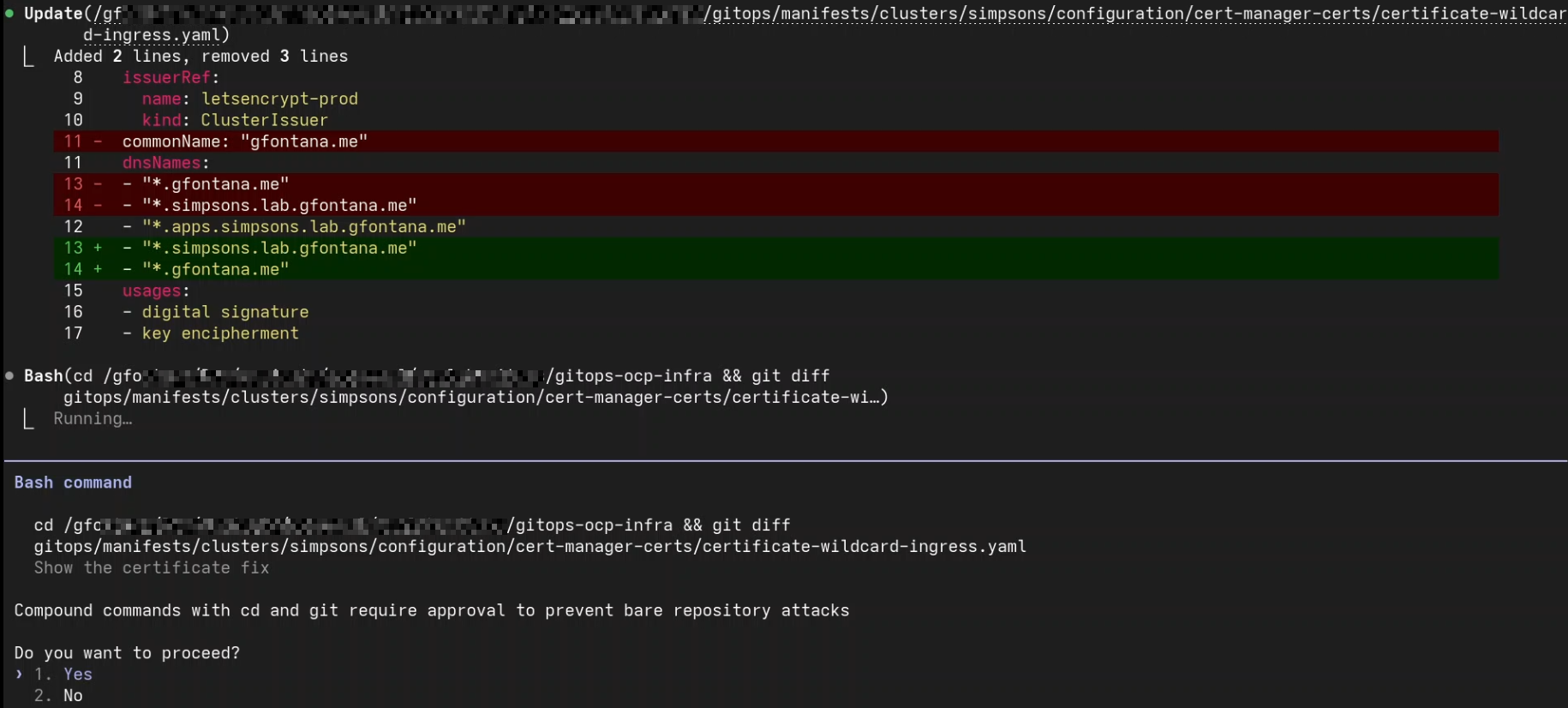
Within minutes of the fix, the certificate was issued successfully by Let’s Encrypt.
Phase 4: IngressController Integration
The final piece was updating OpenShift’s IngressController to use the new certificate. Claude Code created an Argo CD PostSync hook job:
apiVersion: batch/v1
kind: Job
metadata:
  name: patch-ingress-cert-manager
  namespace: openshift-ingress-operator
  annotations:
    argocd.argoproj.io/hook: PostSync
    argocd.argoproj.io/hook-delete-policy: BeforeHookCreation
spec:
  template:
    spec:
      containers:
      - name: patch
        image: registry.redhat.io/openshift4/ose-cli:latest
        command:
        - /bin/bash
        - -c
        - |
          oc patch ingresscontroller default \
            -n openshift-ingress-operator \
            --type=merge \
            -p '{"spec":{"defaultCertificate":{"name":"wildcard-apps-tls"}}}'
      restartPolicy: Never
      serviceAccountName: cli-job-sa
  backoffLimit: 4
This job runs automatically after Argo CD syncs, ensuring the IngressController always uses the cert-manager-issued certificate.
Phase 5: Argo CD Application Definitions
Finally, Claude Code created the Argo CD Application resources to manage everything. My initial thinking was to have only a single Argo CD Application for it. However, Claude created two, the first for the operator itself and second for ingress certificate - which makes a lot of sense and even better than I thought initially!
cert-manager Application (Wave 1):
apiVersion: argoproj.io/v1alpha1
kind: Application
metadata:
  name: cert-manager
  namespace: openshift-gitops
  annotations:
    argocd.argoproj.io/sync-wave: "1"
spec:
  destination:
    namespace: openshift-gitops
    server: https://kubernetes.default.svc
  project: default
  source:
    path: gitops/manifests/clusters/simpsons/aggregate/infra/cert-manager/
    repoURL: https://github.com/giofontana/gitops-ocp-infra.git
    targetRevision: main
  syncPolicy:
    automated:
      prune: false
      selfHeal: true
cert-manager-certs Application (Wave 3):
apiVersion: argoproj.io/v1alpha1
kind: Application
metadata:
  name: cert-manager-certs
  namespace: openshift-gitops
  annotations:
    argocd.argoproj.io/sync-wave: "3"
spec:
  destination:
    namespace: openshift-gitops
    server: https://kubernetes.default.svc
  project: default
  source:
    path: gitops/manifests/clusters/simpsons/aggregate/infra/cert-manager-certs/
    repoURL: https://github.com/giofontana/gitops-ocp-infra.git
    targetRevision: main
  syncPolicy:
    automated:
      prune: false
      selfHeal: true
Sync waves ensure proper ordering: operator and issuer first (wave 1), then certificates and ingress configuration (wave 3).
Act 4: “It’s Magic!”
After pushing all changes to Git, I watched Argo CD work its magic:
$ oc get certificate wildcard-apps-cert -n openshift-ingress
NAME                 READY   SECRET              AGE
wildcard-apps-cert   True    wildcard-apps-tls   5m
True means the magic worked! Let me verify:
$ oc get secret wildcard-apps-tls -n openshift-ingress -o jsonpath='{.data.tls\.crt}' | base64 -d | openssl x509 -noout -dates -issuer

notBefore=Mar 16 12:00:00 2026 GMT
notAfter=Jun 14 12:00:00 2026 GMT
issuer=C = US, O = Let's Encrypt, CN = R12
Perfect. A legitimate Let’s Encrypt certificate, valid for 90 days, with automatic renewal scheduled for May 15, 2026 (30 days before expiry). The OpenShift console was now serving the Let’s Encrypt certificate. The router pods had restarted automatically, and everything just worked.
What Made Claude Code Special
This wasn’t just about saving time—it was about the quality of the collaboration. Here’s what impressed me:
1. Pattern Recognition
Claude Code immediately understood my GitOps repository structure and created all the new manifests following it. This kind of contextual awareness is exactly what you want in a pair programming partner.
2. Real-Time Debugging
When the certificate request failed due to the missing gfontana.me entry in dnsNames, Claude Code:
- Analyzed the error logs
- Identified the root cause
- Proposed the fix
- Implemented it immediately
No googling, or searching Stack Overflow. No reading through cert-manager documentation for 30 minutes.
3. Best Practices Built-In
- Sync waves for proper resource ordering
- SealedSecrets for sensitive data
- PostSync hooks for IngressController patching
- Proper RBAC for the patch job
Claude Code knew these patterns and applied them without being told.
4. Multi-Layer Understanding
The implementation required knowledge of:
- OpenShift IngressController architecture
- cert-manager CRDs and workflows
- Kustomize overlays and aggregation
- Argo CD application patterns
- Kubernetes RBAC and ServiceAccounts
- Let’s Encrypt ACME protocol and DNS-01 challenges
- Cloudflare API integration
Claude Code navigated all these layers seamlessly and very quickly.
5. Adaptive Problem-Solving
When initial approaches didn’t work, Claude Code didn’t retry the same commands. It analyzed, adapted, and found alternative solutions. That’s intelligent automation.
The icing on the cake - This article!
To end my engagement with Claude in the best way I asked it the following:
Now use all the procedure executed here and write an article about how I used Claude Code this morning to quickly renew OpenShift certificates for my lab and also deployed cert-manager and configure it with Argo CD to auto renew the certificates. Write an article in my github pages at: <my github pages>
It learned my GitHub pages structure and wrote a big part of this article for me. I just had to review it, add my personal touch and style, and voilà—a new blog post ready to publish!
Conclusion: A Morning Well Spent
What started as a frustrating certificate expiration alert turned into a nice experimentation experience with Claude Code. With Claude Code as my AI pair programming partner, I:
- Quickly renewed an expiring certificate in minutes instead of hours
- Deployed cert-manager using GitOps best practices
- Automated renewals: certificates now auto-renew 30 days before expiration
- Eliminated toil and saved a few hours annually
- Learned patterns I can apply to other infrastructure automation
- Shared my experience by writing this article
The real revelation wasn’t just the time saved—it was the quality of the collaboration. Claude Code understood my environment, adapted to my patterns, debugged issues in real-time, and applied best practices throughout.
What about you? Are you using AI assistants like Claude Code to automate repetitive tasks? Share your thoughts! I’d love to hear your experiences!
Resources
- Repository: gitops-ocp-infra
- cert-manager Documentation: cert-manager.io
- Claude Code: Anthropic’s AI-Powered CLI
- Argo CD: argoproj.github.io/cd
Why “Simpsons”?
A couple of years back I struggled a lot to find good names for my lab resources and easily remember them. So I decided to name all my lab resources after cartoons. I love Simpsons, so decided to name my main cluster as simpsons. This cluster has 4 nodes: Homer, Marge, Bart and Lisa. The node with more resources - biggest or fatter - is obviously Homer. The smartest (which has a GPU) is Lisa. And so on. I have another small cluster that sits next to Simpsons, what is its name? Flanders, of course!
So, that way I gave names that are meaningful and help me remember what they have… and it is also kind of funny! lol


Website : http://giofontana.github.io